
For an outdoor fan power-options RFQ, separate the fan input, the supplied charging accessories and any proposed output function into different fields. Identify the exact model and sample revision, then ask the supplier to confirm each function with matching labels and instructions. A connector shape, charging illustration or catalogue headline does not establish its direction, electrical rating or compatibility with another device.
Identify the offered model before discussing power
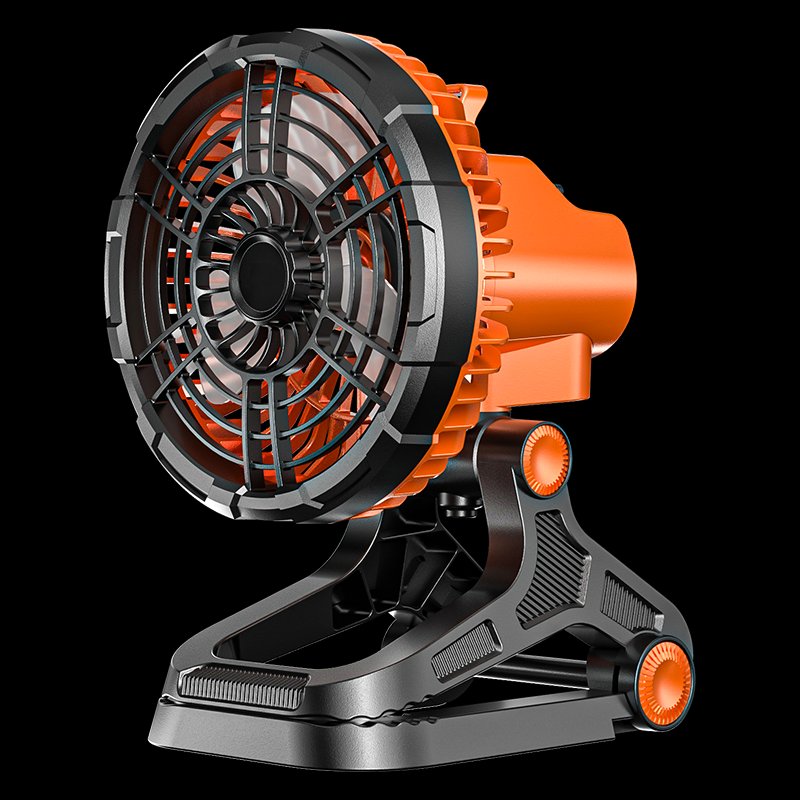
The official Model F-X88 page provides a specific catalogue reference for this enquiry. Its selected image shows an orange and black fan with a clip-style base. Use that reference to locate the requested item, without treating the pictured construction as a verified clamp rating or the page description as an accepted electrical specification. The procurement record should begin with the model, the offered revision and an identifiable sample.
Ask the supplier whether the quotation refers to the same version shown on the linked page. If another power arrangement is proposed, give it a separate option identifier rather than placing two versions under one ambiguous model line. Keep the reference image and the supplier reply together. This helps the buying team distinguish a changed offer from a changed explanation of the original item.
Draw three separate information boundaries
First identify how the offered fan receives power or is charged. Next identify which external components, if any, belong to the quoted supply. Finally identify any output function the supplier is offering for another device. These questions are related, but an answer to one does not answer the others. A cable shown near a product is not a complete description of the proposed charging arrangement or its contents.
Use a labelled interface diagram or clear sample photographs to connect each supplier statement to the relevant connection. Ask the supplier to distinguish functions that use a shared connector from functions that use different connections. Do not resolve an unclear direction by trying an assumed connection. Request the model-specific instructions and supplier clarification, and keep an unresolved field open until the meaning is confirmed.
RFQ field | Question to ask | Record to retain
Fan input | Which input arrangement applies to this offered revision? | Supplier interface description
Power accessory | What cable or external supply is included, if any? | Separate component and quantity list
Proposed output | Is any output function part of this exact offer? | Model-specific function confirmation
Connection identification | Which labelled connection matches each function? | Annotated sample view
Documentation | Which instructions apply to the submitted sample? | Document identifier and revision
Ask for matching labels and instructions
Request readable photographs of the offered sample labels and any separately supplied power accessory labels. The useful question is whether the documents, labels and quotation all refer to the same offered arrangement. If a label cannot be read, ask for a clearer record rather than transcribing a guessed value. A catalogue illustration can locate a feature, but it should not replace the label evidence for the actual sample.
Keep declared values and the evidence supporting them in separate columns. The supplier may provide a model-specific specification sheet, instructions or another named document. Record its scope and revision. Do not convert a marketing reference into a certification statement, and do not treat a document for another model as applicable merely because the product looks similar. Ask the supplier to identify the applicable item explicitly.
Compare offers using the same supply boundary
Compare the complete proposed arrangement before comparing commercial lines. One offer may include a separately identified component while another leaves it optional or excluded. That difference needs a clear record even if both use the same product photograph. Specify whether the requested quotation unit is the fan alone or a named set of listed components, and ask the supplier to repeat that unit in its response.
When an alternative accessory is offered, retain its identifier and the supplier confirmation of its intended use with the fan version. Do not silently substitute a generic part description in the comparison sheet. The buyer should be able to reopen the RFQ and understand which option was discussed, what was included and which compatibility questions were still awaiting an answer. This does not require adopting the catalogue performance claims.
• Keep the fan model and sample revision visible on every option record.
• Separate input, supplied accessories and output-function questions.
• Retain readable labels alongside the applicable instructions.
• Leave uncertain direction or compatibility fields unresolved until confirmed.
Carry the confirmed arrangement into the sample file
After the supplier answers, create a short sample component record using the same option identifiers. Link it to the quotation, interface view and document references. If a later sample uses another accessory or label revision, record the change instead of overwriting the earlier file. An unchanged decorative appearance does not establish that the power arrangement is unchanged.
Send the remaining questions through the official contact channel with the product reference attached. Ask for a clear response to each open field rather than a general assurance that the fan is suitable. Keep prices, availability, delivery arrangements and any requested supporting declarations as separately confirmed parts of the offer. The finished record should explain the proposed supply, not promise a rating or a use case that the buyer has not verified.
Frequently asked questions
Does a connector photograph establish whether it is an input or output?
No. Use the photograph to identify the connection, then request a model-specific explanation and instructions. Direction and supported use need explicit confirmation.
Does an accessory in a catalogue picture belong to the quotation?
Not automatically. Ask the supplier to list the included parts and quantities, with optional or excluded components marked separately.
Should two power arrangements share one RFQ line?
They can be linked to the same model enquiry, but each arrangement should have its own option identifier and component record so the buyer can compare the actual proposed supply.
Product and contact references
Catalogue reference: confirm matching item: https://xstoutdoor.com/product/model-f-x88/
Related catalogue reference: https://xstoutdoor.com/product/model-f-x99/
Contact XST Outdoor: https://xstoutdoor.com/contact/
XST Outdoor blog: https://xstoutdoor.com/blog/